What is actually inside a Qualcomm firmware package
Open a Qualcomm firmware package for the first time and you are looking at a hundred files with names like NON-HLOS.bin, sbl1.mbn, rpm.mbn and gpt_both0.bin. Guides tell you to point QFIL at the folder and press Download. They rarely tell you what any of it is.
That gap matters. When a flash fails, knowing which file does what is the difference between fixing the actual problem and reflashing the whole package again hoping for a different result.
What you are looking at
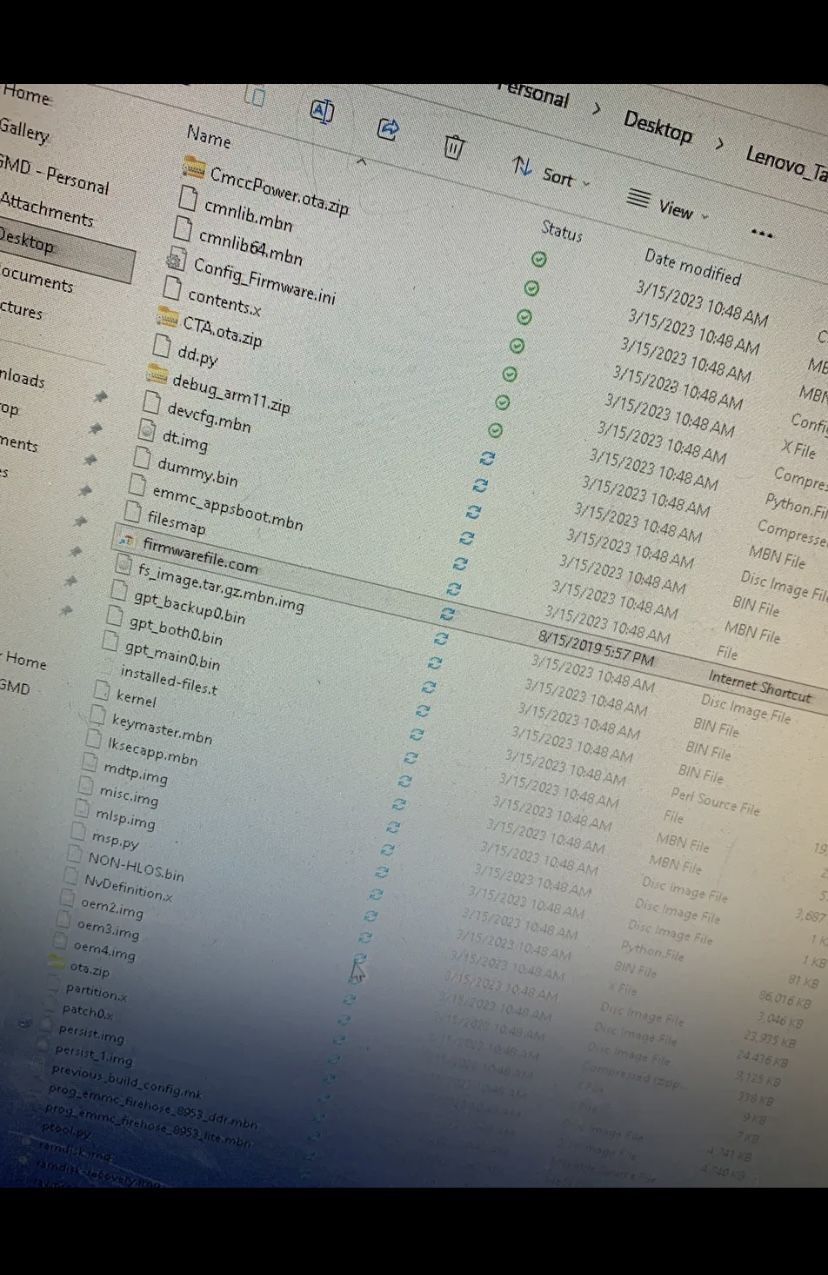
The good news: for a standard flash you interact with exactly three of them. Everything else is data those three files reference.
The three files that actually matter
| File | What it does |
|---|---|
| prog_emmc_firehose_8953_ddr.mbn | The programmer, or loader. Your PC sends this to the device first, over the Sahara protocol. It runs in the device's RAM and turns it into something that can accept a flash. Chipset-specific — the 8953 in the name is the MSM8953 designation. |
| rawprogram0.xml | The instruction list. It tells the loader which image file goes to which partition, at which sector, and how large it is. This is the actual flashing script. |
| patch0.xml | Post-flash corrections. Mostly GPT header fixes that have to be applied after the partitions are written. Skipping it can leave a device that flashed "successfully" and still will not boot. |
When QFIL asks you for a programmer path and then loads XML, this is what it is asking for. Nothing else in the folder needs to be selected by hand.
The ddr and lite variants of the firehose file are not interchangeable. If one produces a Sahara failure, trying the other is a reasonable next step — but understand you are testing a loader, not fixing firmware.
The rest of the package, grouped

Boot chain
Qualcomm devices boot through a chain of small signed binaries, each verifying and loading the next. In package terms:
sbl1.mbn— secondary bootloader, the first stage after the boot ROMrpm.mbn— resource and power management firmwaretz.mbn— TrustZone, the secure worldemmc_appsboot.mbn— the applications bootloader, the part that gives you fastbootdevcfg.mbn,keymaster.mbn,cmnlib*.mbn— device configuration and security modules loaded along the way
These are why a failed flash bricks a device so thoroughly. Damage anything in this chain and there is nothing left to load the next stage. The boot ROM below it survives — which is exactly why the device still answers on a 9008 port when everything above is ruined.
Partition images
NON-HLOS.bin— the modem firmware. Radio, cellular, RF calibration behaviour.system.img— Android itselfboot.img— kernel and ramdiskrecovery.img— stock recoverypersist.img— sensor calibration and per-device data. Worth knowing about, because a wiped persist partition produces odd faults like broken sensors that look nothing like a flashing problem.misc.img,mdtp.img,oem*.img— smaller device-specific partitions
Partition table
gpt_main0.bin,gpt_backup0.bin,gpt_both0.bin— the GPT partition table and its backup copy
These define the storage layout itself. Flashing a GPT from a different device or variant repartitions your storage to someone else's layout, which is one of the more effective ways to make a bad situation worse.
Scripts and config
ptool.py, dd.py, singleimage.py, msp.py, Config_Firmware.ini and similar files are build and packaging tools that ship alongside the images. You do not run them during a normal flash.
How to tell a package is wrong for your device
Before you flash anything, a few checks are worth the two minutes:
- Check the firehose filename against your chipset.
8953means MSM8953. If your device is a different chipset, this package is not yours. - Open
rawprogram0.xmlin a text editor. It is readable. The partition names and sizes tell you a great deal about which device the package was built for. - Look for a build or model string. Many packages carry the model designation in a config file or folder name.
- Compare against your own partition table. If you dumped the GPT with
printgptas described in the connection setup guide, you can compare partition names and sizes directly. This is the most reliable check available to you.
A package missing rawprogram0.xml or the firehose loader is not a flashable package. It may be a dump, an OTA, or a partial upload. That is worth checking before you conclude your device is the problem.
Frequently asked questions
- Do I need to flash every file in the package?
- No.
rawprogram0.xmldecides what gets written. You point the tool at the loader and the XML, and it handles the rest. - Can I flash just one partition?
- Yes, and it is often the smarter move. If only
boot.imgis damaged, replacing that alone is far lower risk than rewriting everything including the GPT. - What is the difference between the ddr and lite firehose files?
- They are built for different memory initialisation paths. If one fails at the Sahara stage, the other is worth trying — but a Sahara failure is usually a connection problem rather than a loader problem.
- Why does my package have both rawprogram0.xml and rawprogram_upgrade.xml?
- Different flashing scenarios. The upgrade variant typically preserves user data while the standard one does a full write. Check which one your tool loaded before assuming your data is safe.
- Is NON-HLOS.bin related to IMEI?
- It is the modem firmware, not your identity data. IMEI and RF calibration live in NV storage, which is a separate area — the same area a QCN restore writes to.
Not sure whether a package matches your device? Send me your model number and the firehose filename from the package. Those two together answer it most of the time.